Introduction
This series of posts provides a walkthru of the tools and methods I used to crack the Malware RE samples listed in the following THM Room – https://tryhackme.com/r/room/basicmalwarere.
I am a malware RE newbie and these methods are by no means the best way to crack the samples and find the flag. Comments and suggestions are welcome.
WARNING: Always analyze malware in a safe environment. Please see the Resources for a guide on setting up such an environment.
TOOLS: I used a Flare VM setup with an Internal Network configuration to analyze the samples. Specifically Floss and x32dbg and a bit of Python scripting where applicable.
All the challenges listed have the following common theme.
- The malware, when executed, prints an MD5 checksum in a MessageBox.
- There are a bunch of strings (flags) hidden inside the binary at some location.
- The final string that is printed out is created by MD5 encoding one of the above mentioned strings (flags).
- Our goal is to find the flag that produced the output that we see when we execute the sample.
Strings::Challenge 1
Sample Name: strings1.exe_
Let us rename this to strings1.exe and detonate it. We see the following MessageBox.
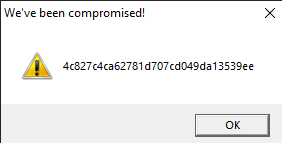
Let us copy the hash as we need this for future analysis.
4c827c4ca62781d707cd049da13539eeWhere are the strings ?
Now that we have the target hash, let us do a strings analysis of the sample to look for the flags.
C:\SAMPLES\THM\strings1
λ FLOSS.exe  strings2.exe_  > allstrings
λ type allstrings
We see a bunch of strings looking like flags.

Let’s look at how many strings look like flags.
C:\SAMPLES\THM\strings1
λ grep FLAG allstrings  | wc -l
4195
That’s a lot of strings to go through manually. Lets isolate these FLAGS in a separate file.
strings strings1.exe_ | grep FLAG > FLAGS
A simple Python script can automate this process for us. Save the following code in a file e.g. find_flag.py
# USAGE: python find_flag.py <flag_file_name>

import hashlib
import sys

crackme = sys.argv[1]
with open(crackme, "r") as f:
    lines = f.readlines()

TARGET = '4c827c4ca62781d707cd049da13539ee'

for line in lines:
    line = line.strip()
    h = hashlib.md5(line.encode('utf-8')).hexdigest()
    if h == TARGET :
        print ("FOUND:" ,line, h)
        break
print("DONE")
Run this program passing in the FLAGS file as a parameter.

Conclusion
This sample was a really simple one to crack as the strings were also stored in the program without any obfuscation. The key takeaway is that a simple script in a language such as python can make this process less tedious and repeatable.
In our next article, we will look at a sample that stores samples in a more sophisticated manner.
Resources
- Internal Network Vs Host-Only https://notes.huskyhacks.dev/blog/malware-analysis-labs-internal-network-vs-host-only
- Samples Files and Challenge: https://tryhackme.com/r/room/basicmalwarere
 Cyber Learnings
Leave a comment