Introduction
This series of posts provides a writeup of the tools and methods I used to crack the Malware RE samples listed in the following THM Room – https://tryhackme.com/r/room/basicmalwarere. In this writeup, we look at the 2nd challenge (Strings2).
I am a malware RE newbie and these methods are by no means the best way to crack the samples and find the flag. Comments and suggestions are welcome.
WARNING: Always analyze malware in a safe environment. Please see the Resources for a guide on setting up such an environment.
TOOLS: I used a Flare VM setup with an Internal Network configuration to analyze the samples. For this sample, I specifically used Mandiant Floss and x32dbg.
Strings::Challenge 2
Sample Name: strings2.exe_
Let us rename this to strings2.exe and detonate it. We see the following MessageBox.

Let us copy the hash as we need this for future analysis.
e41509c99d1462fa384ee99f350593fcWhere are the strings ?
Now that we have the target hash, let us do a strings analysis of the sample to look for the flags.
C:\SAMPLES\THM\strings2
λ FLOSS.exe  strings2.exe_  > allstrings
λ type allstrings
Though the strings are not directly visible as with the first challenge, we do see that FLOSS was able to retrieve the FLAG. This was expected since FLOSS analyzes files and looks for the following:
- strings encrypted in global memory or deobfuscated onto the heap
- strings manually created on the stack (stackstrings)
- strings created on the stack and then further modified (tight strings)
 ─────────────────────────
  FLOSS STACK STRINGS (1)
 ─────────────────────────

FLAG{xxxx-xxxx-xxxx-xxxx-xxxx}
This provides us a clue as to where these strings(flags) might be stored in the binary. The purpose of RE / MA is not just to get flags but understand what is happening underneath. Let’s dig in some more.
There are a few interesting strings that we can use for further analysis.
We've been compromised!
MessageBoxA
Let’s open this binary in x32dbg. Press F9 to hit the first breakpoint. Now we want to set a breakpoint that allows us to see the string as it is constructed prior to being set an an argument to the MessageBox function call.
Right Click => Search For => All Modules => String references.
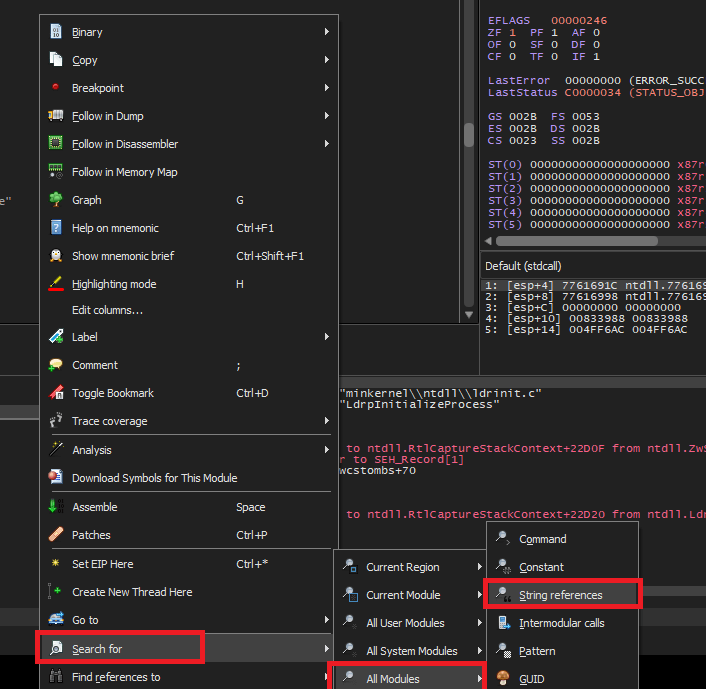
Look for the familiar string that we saw in the message box when the binary was executed and set a breakpoint on it.

Continue debugging by pressing F9 until we hit the breakpoint.

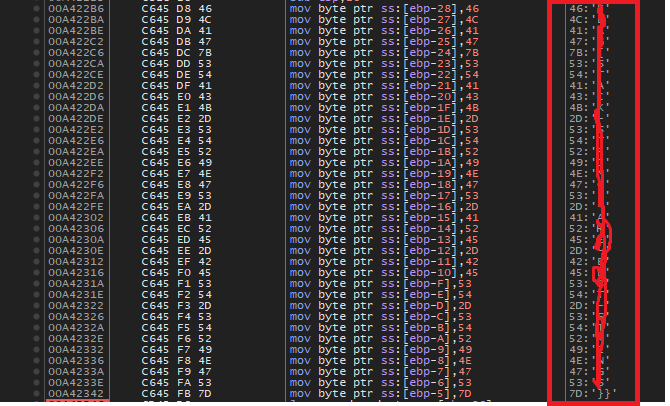
Backing up a couple of instructions, we notice that EAX is being populated with the contents of the stack string.

lea eax, dword ptr ss:[ebp-28]Let’s set a breakpoint here and restart the debugging.
We can see the complete flag transferred over from the stack to the EAX register.

Conclusion
This sample stores the flag using the stack string technique – using a series of MOV instructions transferring constant values into adjacent locations on the stack. x32dbg is a great tool to watch this technique unfold in real time.
In our next writeup, we will look at a sample that stores flags inside a binary in another interesting way.
Resources
- Internal Network Vs Host-Only https://notes.huskyhacks.dev/blog/malware-analysis-labs-internal-network-vs-host-only
- Samples Files and Challenge: https://tryhackme.com/r/room/basicmalwarere
- Mandiant FLOSS: https://github.com/mandiant/flare-floss/blob/master/doc/usage.md
- Stack Strings – https://www.tripwire.com/state-of-security/ghidra-101-decoding-stack-strings
 Cyber Learnings
Leave a comment