Introduction
This series of posts provides a writeup of the tools and methods I used to crack the Malware RE samples listed in the following THM Room – https://tryhackme.com/r/room/basicmalwarere.
In this writeup, we look at the 3rd challenge (Strings3).
I am a malware RE newbie and these methods are by no means the best way to crack the samples and find the flag. Comments and suggestions are welcome.
WARNING: Always analyze malware in a safe environment. Please see the Resources for a guide on setting up such an environment.
TOOLS: I used a Flare VM setup with an Internal Network configuration to analyze the samples. For this sample, I specifically used Mandiant Floss the python pefile module.
Strings::Challenge 3
Sample Name: strings3.exe_
Let us rename this to strings3.exe and detonate it. We see the following MessageBox.
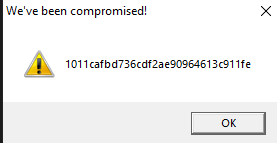
Let us copy the hash as we need this for future analysis.
1011cafbd736cdf2ae90964613c911feWhere are the strings ?
Now that we have the target hash, let us do a strings analysis of the sample to look for the flags.
C:\SAMPLES\THM\strings3
λ FLOSS.exe  strings3.exe_  > allstrings
λ type allstrings
FLOSS was able to retrieve the FLAG strings.
 +-------------------------------------+
| FLOSS STATIC STRINGS: UTF-16LE (50) |
+-------------------------------------+

2FLAG{WHATSOEVER-PRODUCT-INCIDENTAL-APPLICABLE-NOT}'FLAG{COPY-YOU-PROVISION-DISCLAIMER-ARE}&FLAG{THE-LICENSED-WITHIN-SERVICES-LAW} ....
......
This provides us a clue as to where these strings(flags) might be stored in the binary. We could use 2 approaches in finding the flag.
- Clean up and save all flags in a file and use the Python program from Challenge 1 to find the target flag. This has been done before and will surely find the flag.
- Dig deeper to find how these strings are stored in the PE binary, extract them and compare them against the target above.
Since RE/MA is a journey of learning and discovery, we will use approach 2.
Let’s first open the sample in PE-bear. We discover these flags inside the .rsrc section of the PE image. This section is used to store resources used by an application, such as icons, images, menus, and strings.
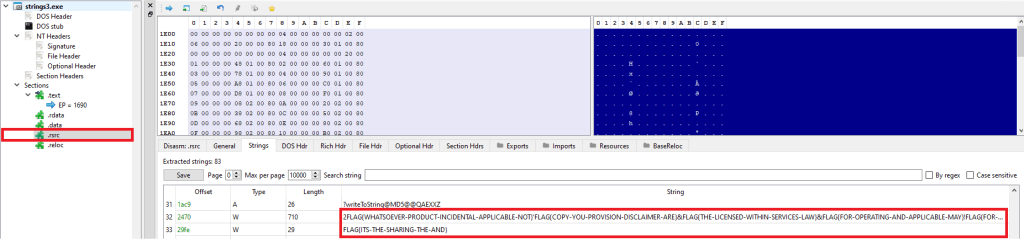
I came across an interesting Python library, named pefile which provides programmatic access to the various parts of a PE image. Let’s see if we can use this to find this flag.
Incidentally, there was this readily available sample (see Resources) which I modified slightly to give us the flag. This code parses the PE file, and extracts the flags from the resource section to a list that we use to extract the flag.
Look for “Modified” for changes made to the original code,.
#python

import pefile
import hashlib

pe =  pefile.PE('strings3.exe_')

# TARGET is seen by executing the binary. It can also be extracted by debugging using x32Dbg.

# MODIFIED
TARGET = "1011cafbd736cdf2ae90964613c911fe"

entries = [entry.id for entry in pe.DIRECTORY_ENTRY_RESOURCE.entries]

# storage for extracted strings.
strings = list()

rt_string_idx = [entry.id for entry in   pe.DIRECTORY_ENTRY_RESOURCE.entries].index(pefile.RESOURCE_TYPE['RT_STRING'])

# Get the directory entry
#
rt_string_directory = pe.DIRECTORY_ENTRY_RESOURCE.entries[rt_string_idx]

# For each of the entries (which will each contain a block of 16 strings)
#
for entry in rt_string_directory.directory.entries:

  # Get the RVA of the string data and
  # size of the string data
  #
  data_rva = entry.directory.entries[0].data.struct.OffsetToData
  size = entry.directory.entries[0].data.struct.Size
  #print ('Directory entry at RVA', hex(data_rva), 'of size', hex(size))

  # Retrieve the actual data and start processing the strings
  #
  data = pe.get_memory_mapped_image()[data_rva:data_rva+size]
  offset = 0
  while True:
    # Exit once there's no more data to read
    if offset>=size:
      break
    # Fetch the length of the unicode string
    #
    ustr_length = pe.get_word_from_data(data[offset:offset+2], 0)
    offset += 2

    # If the string is empty, skip it
    if ustr_length==0:
      continue

    # Get the Unicode string
    #
    ustr = pe.get_string_u_at_rva(data_rva+offset, max_length=ustr_length)
    offset += ustr_length*2
    strings.append(ustr)
    #print ('String of length', ustr_length, 'at offset', offset)

# MODIFIED CODE - iterate, convert to MD5, compare against # TARGET
for line in strings:
    line = line.decode('utf_8','strict')
    h = hashlib.md5(line.encode('utf-8')).hexdigest()
    if h == TARGET:
        print ("FOUND:" ,line, h)
Executing the code on the Flare VM, we can see the flag.

Conclusion
This sample stores the flags inside the PE binary in the .rsrc (resources) section.
Resources
- Internal Network Vs Host-Only https://notes.huskyhacks.dev/blog/malware-analysis-labs-internal-network-vs-host-only
- Samples Files and Challenge: https://tryhackme.com/r/room/basicmalwarere
- Mandiant FLOSS: https://github.com/mandiant/flare-floss/blob/master/doc/usage.md
- Python PE module (Reading Resource Strings) – https://github.com/erocarrera/pefile/blob/wiki/ReadingResourceStrings.md
- PE File Resource section – https://learn.microsoft.com/en-us/windows/win32/debug/pe-format#the-rsrc-section
- Hasherezade’s PE-bear https://github.com/hasherezade/pe-bear
 Cyber Learnings
Leave a comment